
Introduction
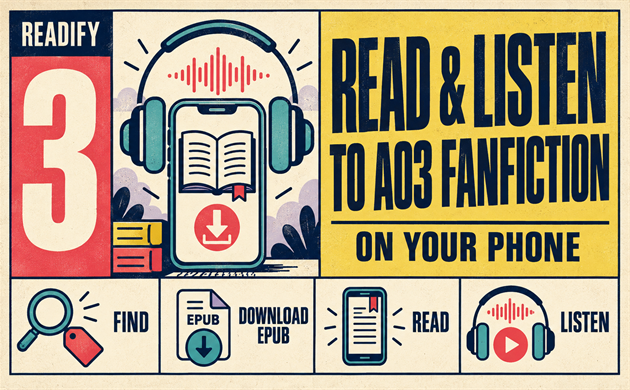
Long AO3 fics are perfect for a quiet evening, but reading thousands of words on a phone screen is not always comfortable. An AO3 app-style workflow can make it easier to save a story, read it offline, and switch to audio when you are walking, commuting, cooking, or resting your eyes.
AO3 does not need to stay inside a browser tab. You can find AO3 fanfic on your phone, download it as an EPUB, and import the file into Readify for flexible reading and listening. This approach works whether you searched for an AO3 app, an a03 app, or simply a better way to enjoy long fanfiction on mobile.

What Is AO3?
AO3 stands for Archive of Our Own, a nonprofit fan-created archive operated by the Organization for Transformative Works. It hosts fanfiction, fan art, podfic, and other transformative works across thousands of fandoms.
People searching “what is AO3,” “ao3 meaning,” “what are fanfics,” or “what is fanfic” are usually trying to understand both the site and its community. A fanfic is a fan-created story based on existing characters, worlds, relationships, or ideas. AO3 fanfiction can range from a short one-shot to a multi-chapter story with hundreds of thousands of words.
The AO3 website is designed to make those works easy to browse through fandom names, relationships, characters, ratings, warnings, and freeform tags. That depth is one reason AO3 fanfics can be so enjoyable to discover—but it also means readers often want a more comfortable mobile reading setup after they find a story they love.
Is There an Official AO3 App?
AO3 is primarily a website, not a native mobile app. You can open the AO3 website in Safari, Chrome, or another mobile browser, sign in if you have an account, browse works, and download files directly to your phone.
That distinction matters. Readify is not an official AO3 app, does not host AO3 fanfiction, and does not connect to your AO3 account. Instead, it gives you a way to open EPUB files that you have already downloaded and turn your saved reading into an audio-friendly experience.
If you see search terms such as a03 app, a03 website, a03 fanfic, or a03 fanfiction, they usually refer to the same platform. “A03” is a common typo: the correct spelling is AO3, with the letter O.
Why Reading Long AO3 Fanfiction on a Phone Can Feel Hard
Reading AO3 fanfic in a mobile browser is convenient, but it is not ideal for every situation. A long fic may have dozens of chapters, dense paragraphs, and a reading session that lasts for hours.
You may want to keep reading while:
- Riding public transit
- Taking a walk
- Doing chores
- Traveling without reliable internet
- Resting your eyes before bed
- Following a long slow-burn or multi-chapter series
For those moments, an AO3 app workflow based on downloaded EPUB files can be more practical than keeping a browser tab open. You can save the story, control your reading environment, and use text-to-speech when you want to listen to fanfiction instead of reading every line on screen.
How to Find AO3 Fanfic Worth Downloading
Before downloading a fic, use the AO3 website’s tags and filters to narrow your options. AO3 tags are one of the best tools for finding stories that match your mood, favorite characters, preferred relationships, or desired tone.
You might search for:
- A specific fandom or pairing
- Completed works only
- A minimum word count for long-form reading
- Alternate universe, canon divergence, fluff, angst, mystery, or other tropes
- A preferred rating or archive warning
- Works in your preferred language
The AO3 search and browse guide explains how readers can use filters and search tools on the archive. You can also review the AO3 tags FAQ if you are new to tag-based browsing.
If you are looking for the best fanfiction for a long trip or a quiet weekend, choose a completed work with a clear summary, tags you understand, and a length that suits your listening time. A 10,000-word one-shot may be perfect for an afternoon; a 200,000-word AO3 fanfiction may be better for a week of commutes.
How to Read AO3 on Your Phone
You can read AO3 fanfiction on your phone directly through a browser.
- Open the AO3 website in your mobile browser.
- Use AO3 search, fandom pages, tags, bookmarks, or recommendations to find a work.
- Open the story page and read the summary, rating, warnings, relationships, and tags.
- Start reading in the browser or choose Download to save the work for later.
For browser-based reading, you can also use your device’s text-size controls, reader mode where available, and dark mode settings. But if your goal is offline reading or a more flexible listening routine, downloading the work as an EPUB is usually the better next step.
How to Download AO3 Fanfiction as EPUB
AO3 offers several download formats for many works, including EPUB, PDF, HTML, AZW3, and MOBI. Its official downloading guide explains where to find these options.
To download AO3 EPUB files on your phone:
- Open the AO3 fanfic you want to save.
- Find the Download section near the top of the work page.
- Choose EPUB.
- Wait for the file to download.
- Save it to your Files or Downloads folder.
When you download AO3 EPUB files, the file includes the chapters that were published at that time. If an ongoing AO3 fanfiction updates later, download the work again to get the newest chapters.
EPUB is a useful format because it is designed for reflowable digital reading. Text can adapt to different screen sizes and reading settings, which is why EPUB is often more comfortable on phones than a fixed-layout document. You can learn more about the format from the W3C EPUB overview.
EPUB, PDF, HTML, AZW3, or MOBI: Which Format Should You Choose?
For most people using an AO3 app-like mobile workflow, EPUB is the best starting point.
EPUB is usually the most flexible choice for phone reading and text-to-speech. It is well suited to adjustable text, saved reading sessions, and importing into an EPUB reader. If you want to open a story in Readify and listen to fanfiction, download AO3 EPUB first.
PDF can be useful if you want a fixed visual layout, but it may be less comfortable on a small screen. HTML is lightweight and easy to open in a browser, though it may not offer the same reading controls as an EPUB reader. AZW3 and MOBI are more closely associated with Kindle workflows.
For an AO3 app alternative that supports local reading and listening, EPUB is the simplest and most practical option.
How to Import AO3 Fanfiction into Readify
After you download AO3 EPUB, you can import the file into Readify.
- Open Readify on your phone.
- Choose the option to import a local EPUB file.
- Locate the AO3 fanfiction file in your Downloads or Files folder.
- Open the imported fic in your library.
- Adjust your reading settings before you begin.
This gives you a cleaner way to continue with AO3 fanfic after leaving the AO3 website. You can use Readify as an [EPUB reader](/epub-reader) when you want a dedicated reading space, instead of repeatedly navigating browser tabs or searching through downloaded files.
A downloaded fic remains your local file. Readify does not scrape AO3, unlock restricted works, or replace AO3’s own search, tagging, and account functions. It simply helps you read or listen to a file you chose to download.
How to Listen to AO3 Fanfiction with Readify
The most useful part of this workflow is the ability to switch from reading to listening. Once an AO3 fanfiction EPUB is imported, Readify can turn the text into a more flexible listening experience.
Choose a voice and playback speed that feel comfortable, then start the story while you are away from the screen. You can listen to fanfiction during routines that make conventional reading difficult, such as folding laundry, commuting, exercising, or winding down at night.
Text-to-speech is especially helpful for long AO3 fanfics. You can follow a 50-chapter slow burn without needing to hold your phone for every chapter. If a scene becomes more emotionally intense or visually detailed, you can return to the text and read at your own pace.
For a more detailed overview of this use case, explore Readify’s [text-to-speech reader](/text-to-speech-reader) tools. The goal is not to replace reading—it is to let you choose the format that fits your day.
Can You Read AO3 Fanfiction Offline?
Yes. Once you download AO3 EPUB and save the file on your phone, you can open it offline in a compatible reader.
This is useful when you are flying, traveling underground, using limited mobile data, or simply want to avoid relying on an active browser session. Importing AO3 fanfiction into Readify also lets you keep your reading and listening in one place.
An [offline reading app](/offline-reading-app) can be particularly helpful for readers who keep several long fics on their phone. Download a few completed stories before a trip, organize them in your library, and choose one whenever you have time to read or listen.
Remember that offline files do not update automatically. If an author adds a new chapter to an ongoing AO3 fanfiction, return to the AO3 website and download the latest EPUB version.
A Simple Mobile Workflow for AO3 Readers
A practical AO3 app workflow looks like this:
- Find a story on the AO3 website.
- Check the summary, tags, rating, warnings, and chapter count.
- Download AO3 EPUB.
- Import the file into Readify.
- Read when you want visual focus.
- Listen to fanfiction when you are away from the screen.
- Download a refreshed file if the work updates.
This workflow is straightforward because every tool has a separate role. AO3 helps you discover and save fanworks. Readify helps you enjoy your downloaded files in more situations.
Safety Tips Before Using Any AO3 App Alternative
Be cautious with third-party services that claim to be an AO3 app, promise automatic account syncing, or ask for your AO3 password. When possible, access AO3 through its official website and download files using the archive’s own download options.
You do not need to give a reading app access to your AO3 login just to read a local EPUB. Keeping the process simple—download from AO3, then import your file—also gives you more control over what is stored on your phone.
When you search a03 app or a03 website, double-check the spelling and destination before signing in. The official archive is Archive of Our Own, commonly known as AO3.
Common Problems and Easy Fixes
I cannot find the Download option on an AO3 work
Check the top area of the work page and look for Download. On mobile, the format links may be displayed differently than they are on desktop. The AO3 download FAQ can help if you are unsure where to look.
The work is still updating
Download the current EPUB, then download it again later when new chapters are published. Your original file will not automatically include future updates.
I searched for an a03 fanfic but cannot find the site
Try searching again with “AO3 fanfic.” AO3 uses the letter O, not the number zero.
I want an official AO3 app
AO3 is primarily accessed through its website. You can use a mobile browser for discovery and downloading, then use a local EPUB reader such as Readify for reading and listening.
Can I listen to any AO3 fanfiction?
You can listen to fanfiction that you have legally downloaded and imported into a compatible text-to-speech reader. Always respect the author’s notes, content warnings, and the archive’s terms of service.
Who This Workflow Is Best For
This AO3 app-style setup is useful for readers who:
- Prefer long AO3 fanfics over short one-shots
- Want to read fanfiction offline
- Get tired from reading on a small screen
- Want to listen to fanfiction while multitasking
- Save completed works for travel
- Enjoy switching between text and audio
- Want a simple way to organize downloaded EPUB files
It is also a good option for readers who are new to fanfiction and are still asking where to read fanfiction. Start with the AO3 website, learn how tags and filters work, choose a story that interests you, and save it in a format that fits your habits.
Frequently Asked Questions
Is there an official AO3 app?
AO3 is mainly a website. You can browse the AO3 website on your phone and download works in supported formats such as EPUB.
What is the best format for reading AO3 fanfiction on a phone?
For most mobile readers, EPUB is a strong option because it adapts to smaller screens and works well with reading and text-to-speech apps.
Can I download AO3 fanfic to my iPhone or Android phone?
Yes. Open the story in a mobile browser, select Download, choose EPUB, and save the file to your device.
Is a03 fanfiction the same as AO3 fanfiction?
Usually, yes. “A03 fanfiction” is a common spelling mistake. The correct name is AO3 fanfiction.
What is a fanfic?
A fanfic, short for fanfiction, is a story created by fans using existing characters, settings, or source material. AO3 hosts a wide range of fanfics across many fandoms.
Final Thoughts
Reading AO3 fanfiction on a phone does not have to mean staring at a browser for hours. Use the AO3 website to discover stories, download AO3 EPUB files for offline access, and import them into Readify when you want a more comfortable reading or listening experience.
With a simple AO3 app workflow, your favorite long fic can follow you beyond the screen—on the train, during a walk, or whenever you want to keep the story going.
