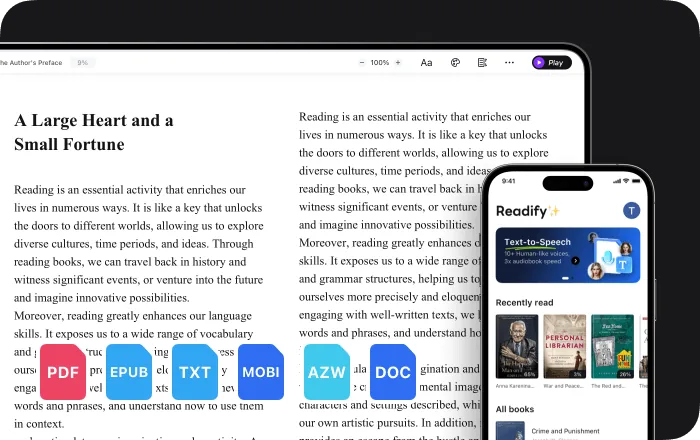
New: natural AI voices in 30+ languages — press play on anything you read
All Topics

Listen While You Multitask

Turn the reading already waiting for you into natural audio. Listen to PDFs, eBooks, documents, and articles while you move through familiar, low-attention tasks—then return to the text whenever it needs your full focus.

iOS App
Listen on iPhone and iPad
Scan to download app
Android App
Listen on any Android device
Scan to download app

Let Routine Tasks Carry Your Reading Forward

Pair familiar moments that leave room for listening with the books, articles, and documents you already want to finish.


Prepare a Meal. Finish an Article.
Put on a saved article, essay, or short chapter while you chop, stir, and wait for dinner. Pause whenever the recipe needs more attention.
Walk the Route. Keep the Story Moving.
Turn a familiar walk or errand into hands-free reading time. Natural narration keeps a novel or long-form article moving without asking you to watch a screen.
Exercise. Review What Matters.
Listen to revision notes, a report summary, or a familiar chapter during a steady run or workout. Save complex passages for a closer read later.
Handle Routine Admin. Clear the Reading Queue.
Pair simple filing, calendar cleanup, or repetitive desk work with a document you have been meaning to review. Stop the audio when the task demands decisions.
Organize the Day. Continue the Book.
Use the time spent sorting notes, packing a bag, or setting up tomorrow's workspace to listen to another section of a book or eBook.
Commute Without Opening Another Screen.
Turn articles, PDFs, and work documents into audio before you leave. Listen on the move and keep your eyes available for the trip around you.
Give Your Eyes One Less Task.
Switch from visual reading to audio when your hands are occupied or your eyes need a break. Keep the original text ready for details, citations, and difficult sections.
Bring the Reading You Already Have.
Readify works with EPUB, PDF, DOCX, AZW, MOBI, TXT, and web content, so multitasking does not limit you to a separate audiobook catalog.

From Reading List to Listening Routine

Add your own material, choose how it sounds, and press play when a familiar task leaves room to listen.


Add What You Want to Read
Step 1
Add What You Want to Read
Upload an EPUB, PDF, DOCX, AZW, MOBI, or TXT file, or open the web content already waiting in your reading list.
Choose a Voice and Pace
Step 2
Choose a Voice and Pace
Pick from 100+ realistic voices across 50+ languages and accents, then set a speed that fits the material and the task.
Listen, Pause, and Resume
Step 3
Listen, Pause, and Resume
Start during a routine task, pause when something needs your attention, and continue from the same place on another device later.

Why Listen While Multitasking?

Audio can make use of moments that are poor fits for screen reading—without pretending every task should compete for your attention.


Use Low-Attention Moments Deliberately
Familiar, repetitive activities can leave room for comfortable listening. Turn those moments into steady progress on reading you already chose.
Keep Your Hands and Eyes Available
Listen when holding a book or watching a screen is impractical. Return to the source text whenever the material needs close inspection.
Make Progress in Short Sessions
A document does not need one perfect block of quiet time. A series of ten-minute listening sessions can keep longer reading moving.
Choose the Right Content for the Task
Use lighter or familiar material while multitasking, and save dense arguments, data, and critical decisions for focused reading.

A Reader Designed to Move Between Tasks

Flexible formats, natural narration, and saved progress help you switch between listening and close reading without losing your place.


Natural Text-to-Speech Narration
Choose from 100+ realistic voices with natural pacing for long-form listening, including support for more than 50 languages and accents.
Your Files and Web Content
Listen to EPUB, PDF, DOCX, AZW, MOBI, TXT, and more. Keep using the books, documents, and articles already in your workflow.
Playback That Adapts to the Moment
Slow down unfamiliar material, use a steady pace for a book, or move faster through sections you already understand.
Pick Up Where You Left Off
Pause when your other task needs attention. Synchronized access makes it easy to continue the same reading on another device later.

Frequently Asked Questions

What can I listen to while multitasking?

Readify can turn EPUB, PDF, DOCX, AZW, MOBI, TXT, articles, and other web content into natural audio, so you can listen to your own reading material.

Which tasks are best for listening while multitasking?

Familiar, repetitive, and low-attention tasks are usually the best fit—for example, meal preparation, walking a known route, simple organizing, or steady exercise. Pause when the task needs more attention.

Should I listen to difficult material while doing another task?

Dense research, unfamiliar concepts, data, and important decisions often deserve focused reading. Use audio for a first pass or review, then return to the original text for close analysis.

Is Readify different from an audiobook app?

Yes. Readify turns your own PDFs, documents, eBooks, and web pages into audio, so you are not limited to titles available in an audiobook catalog.

Can I change the voice and listening speed?

Yes. Choose from 100+ realistic voices across more than 50 languages and accents, then adjust playback speed to suit the material and situation.

Can I pause and continue on another device?

Yes. Readify provides synchronized access across devices, making it easy to stop when another task needs your attention and continue later.

Is Readify free to try?

Yes. Readify is free to start, so you can test it with your own reading material and see which parts of your routine are a good fit for listening.