All Topics

Screen-Free Reading

Turn the books, articles, PDFs, and documents you already want to read into natural audio. Keep the ideas moving while your eyes are on the walk, the meal, the room, or simply somewhere other than a screen.

iOS App
Listen on iPhone and iPad
Scan to download app
Android App
Listen on any Android device
Scan to download app

Read Beyond the Screen

Screen-free reading gives the same source material another way to fit your day. Listen to the complete text now, then return to the page whenever a quotation, chart, or detail needs your eyes.


Step Away from the Desk. Keep the Chapter.
Move a saved article, eBook, or report into audio before you leave the desk. Continue the same reading outdoors without carrying an open screen from place to place.
Take Long-Form Reading on a Walk
Listen to an essay, research paper, or book chapter while you walk. A natural text-to-speech voice keeps the argument moving without asking you to watch each line.
Cook Dinner. Continue the Article.
Start playback before chopping, stirring, or setting the table. Screen-free audio lets a saved article stay with you while your hands and eyes stay on the meal.
Clear the Room. Clear the Reading Queue.
Turn a PDF, newsletter, or web article into a calm background listen while you tidy. Pause or replay whenever a section deserves your full attention.
Keep Reading Through a Workout
Bring familiar material to an easy run, stretch, or low-intensity session. Adjust the playback speed until the narration matches the rhythm of your movement.
Give Your Eyes a Quieter Reading Mode
When another visual session feels uninviting, switch the same text to audio. Close your eyes, listen for a while, and return to the page when you want to read closely again.
Use Waiting Time Without More Scrolling
Turn a commute, queue, or gap between appointments into listening time. Keep your source available for later instead of replacing it with a shortened recap.
Return to the Exact Place in the Text
Use synchronized highlighting when the screen comes back into view. The spoken sentence stays connected to the original document, helping you move between listening and close reading.

From On-Screen Text to Screen-Free Audio in Three Steps

Bring the source you already chose, set a comfortable voice and pace, then listen without giving up the original text.

Add the Reading You Want to Hear
Step 1
Add the Reading You Want to Hear
Open readable web content or add an EPUB, PDF, DOCX, AZW, MOBI, or TXT file. Readify keeps your chosen source at the center of the experience.
Choose a Voice and Set the Pace
Step 2
Choose a Voice and Set the Pace
Select a natural voice and adjust the reading speed for a quick review, a comfortable chapter, or a dense section that deserves more time.
Press Play and Look Away
Step 3
Press Play and Look Away
Listen while you move through the day. Pause, replay, or return to highlighted text whenever you want to examine a sentence more closely.

Why Choose Screen-Free Reading?

Audio gives visual reading a flexible companion. It creates more ways to stay with the full text without turning every open moment into more screen time.


Spend Less Reading Time Fixed to a Display
Move suitable chapters, articles, and documents into audio when you do not need to inspect the page. Keep visual attention available for the world around you.
Make Saved Reading More Portable
A reading queue no longer has to wait for a desk and a quiet screen. Carry the complete source into walks, housework, exercise, and other listening-friendly moments.
Keep the Full Source Within Reach
Screen-free does not mean source-free. Return to the original page for quotations, diagrams, citations, and careful rereading whenever context matters.
Let the Pace Fit the Material
Speed through familiar background, slow down a technical passage, or replay one paragraph. The listening pace can change as the text changes.

A Text-to-Speech Reader Built for Moving Between Modes

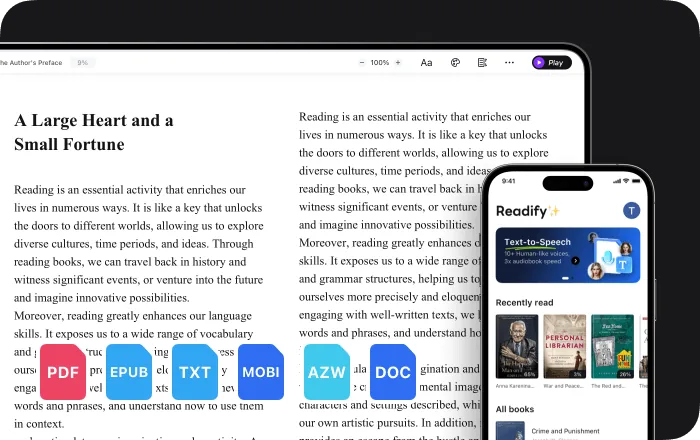
Readify turns documents and web content into natural audio while keeping simple controls and the original words close whenever you return to the screen.

Multi-Format Document Reading
Listen to EPUB, PDF, DOCX, AZW, MOBI, and TXT files in one reading flow instead of finding a different workaround for every format.
Natural Text-to-Speech Voices
Choose a lifelike voice that feels comfortable across long articles, book chapters, reports, newsletters, and study documents.
Speed Control and Synchronized Highlighting
Change the pace at any time, then use highlighted text to reconnect the narration with the exact sentence on screen.
Web Reading with Compact Controls
Use Readify on readable web content with play, pause, voice, and speed controls that stay available without replacing the page you opened.

Frequently Asked Questions

What is screen-free reading?

Screen-free reading uses text-to-speech to turn written material into audio, so you can continue with the same books, articles, and documents without watching every line on a display.

What can Readify read aloud?

Readify supports readable web content and common document formats including EPUB, PDF, DOCX, AZW, MOBI, and TXT. Results for webpages depend on how the site presents its readable content.

Does screen-free reading replace the original text?

No. Readify keeps the original reading available, so you can listen when audio is convenient and return to quotations, charts, links, or close visual reading when needed.

Can I change the text-to-speech voice and speed?

Yes. You can choose a natural voice and adjust playback speed for a quick review, a comfortable long-form listen, or a slower technical passage.

Can I follow the text when I look at the screen again?

Yes. Synchronized highlighting connects the narration to the current sentence, helping you switch between listening and visual reading without losing your place.

Is screen-free reading the same as an audiobook?

Not exactly. An audiobook is a produced recording of a specific title. Readify uses text-to-speech to narrate the compatible books, articles, webpages, and documents you choose.

Is Readify free to try?

Yes. Readify is free to start, so you can test screen-free reading with your own compatible document or readable webpage.