All Topics

Turn the Text You Have Into a Voice You Want to Hear

Readify transforms articles, eBooks, PDFs, documents, and compatible webpages into natural AI narration. Choose a voice, set the pace, and keep the original text close.

iOS App
Listen on iPhone and iPad
Scan to download app
Android App
Listen on any Android device
Scan to download app

Give Everyday Reading a Voice

Use an AI text reader wherever listening makes digital text easier to start, follow, or finish.

Listen to Long Articles
Turn a saved article into natural-sounding narration and continue beyond the first few paragraphs without staying fixed to the screen.
Hear PDFs and Reports
Read documents aloud when a dense report feels easier to process one spoken section at a time.
Make eBooks Speak
Make eBooks Speak
Convert an EPUB, AZW, or MOBI title to speech and move between reading and listening without leaving the book behind.
Review Workplace Documents
Listen through DOCX files, briefs, and internal reading while keeping the source text available for names and details.
Study Notes Out Loud
Give class notes and assigned reading an audio layer, then slow the voice down when a difficult passage needs more attention.
Proofread by Listening
Hear a draft read back to you so repeated words, missing transitions, and awkward phrasing are easier to notice.
Read Compatible Webpages Aloud
Use the browser extension to turn compatible web content into speech without copying every paragraph into another tool.
Step Away From the Screen
Keep up with reading during a walk, commute, or household routine when looking at a display is not practical.

From Digital Text to AI Narration in Three Steps

There is no recording setup: add the reading, choose how it should sound, and press play.
Add What You Want to Read
Step 1
Add What You Want to Read
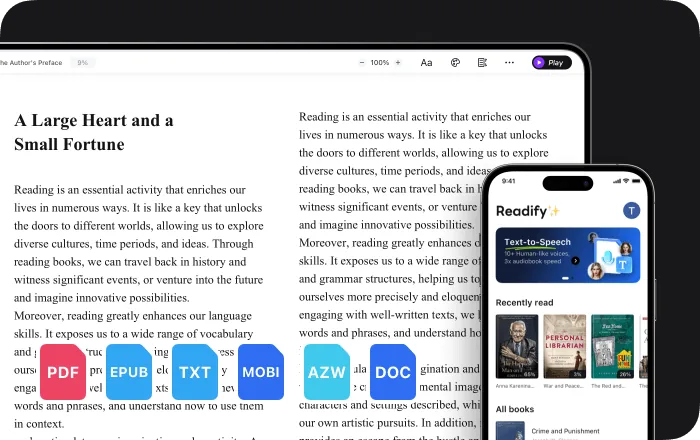
Open a supported PDF, EPUB, DOCX, AZW, MOBI, or TXT file—or start from compatible web content.
Choose a Voice and Pace
Step 2
Choose a Voice and Pace
Select from 100+ AI voices and adjust playback speed until the narration feels comfortable for the material.
Listen and Follow Along
Step 3
Listen and Follow Along
Play, pause, replay, or scan the synchronized highlight while the spoken voice stays connected to the text.

Why Turn Text Into Speech?

AI narration adds a flexible listening path without replacing the source you may still want to see.


Natural Narration Without Recording
Start listening without booking a narrator, setting up a microphone, or producing an audio track yourself.
One Source, Two Ways In
Listen when audio fits the moment, then return to the visible text for spelling, quotations, or closer review.
A Pace You Can Change
Speed up familiar material, slow down complex passages, and pause whenever the ideas need time to settle.
Reading That Moves With You
Shift from desk reading to hands-free listening while keeping the same material at the center.

AI Text-to-Speech Controls That Stay Simple

The essentials are easy to reach, whether you are listening closely or letting a document run in the background.


100+ Realistic Voices
Choose a natural-sounding AI voice that suits the language, subject, and kind of listening you are doing.
Speed, Pause, and Replay
Control the flow instead of adapting your attention to one fixed narration speed.
Synchronized Text Highlighting
See the current words highlighted while they are spoken, making it easier to keep your place on the page.
Files and Web Content
Use AI text to speech with common document and eBook formats, plus compatible webpages through the browser extension.

AI Text to Speech: Frequently Asked Questions

What is AI text to speech?

AI text to speech converts written digital text into synthesized spoken narration. In Readify, the original text remains available so you can listen, read, or combine both modes.

Which file types can Readify read aloud?

Readify supports EPUB, PDF, DOCX, AZW, MOBI, and TXT files. Its browser extension can also work with compatible web content.

Can I choose the AI voice?

Yes. Readify offers more than 100 realistic voices, so you can choose a sound that feels suitable for the document and listening context.

Can Readify clone a person's voice?

Readify is presented here as a text-to-speech reader with a library of AI voices, not as a tool for reproducing a specific person's voice.

Can I change the reading speed?

Yes. Playback speed is adjustable, and you can pause or replay narration whenever you need more time with a passage.

Can I see the text while listening?

Yes. Synchronized highlighting keeps the spoken words connected to the visible text, helping you follow your place.

Is Readify free to try?

Readify offers a free way to start. Current plan details and limits are available in the Readify app.