All Topics

Dyslexia-Friendly Reading

Listen to the words while highlighted text keeps your place. Readify gives books, articles, PDFs, and everyday documents a flexible read-aloud mode you can slow down, replay, or follow on screen.

iOS App
Listen on iPhone and iPad
Scan to download app
Android App
Listen on any Android device
Scan to download app

A Dyslexia Reader for the Text Already in Your Day

Different reading tasks call for different kinds of support. Use natural narration, adjustable speed, and synchronized highlighting wherever listening alongside the words feels useful.


Hear Assignments While Following the Text
Turn class readings and digital handouts into audio. Listen sentence by sentence while highlighting connects each spoken phrase to the words on screen.
Work Through Reports at a Comfortable Pace
Use text to speech for workplace reports, policies, and project documents. Slow down dense sections, replay key details, and keep the original file close.
Listen to Long Web Articles
Use the Readify browser extension to read compatible web content aloud. Keep the article open for links and images while compact controls manage playback.
Take Dense PDFs One Section at a Time
Break a research paper or detailed PDF into a listenable sequence. Pause between sections and replay a sentence before moving on.
Give eBooks a Read-Aloud Option
Open a compatible eBook and choose a natural voice. Move between listening and visual reading without changing to a shortened version of the chapter.
Replay Names, Terms, and Difficult Sentences
Pause when a line needs another pass. Hearing the same words again can provide an additional route through unfamiliar vocabulary or complex phrasing.
Listen Back to Your Own Draft
Add a compatible document and hear how your writing sounds. Listening can make missing words, repeated phrases, or awkward sentences easier to notice before you revise.
Switch Between Listening and Reading
Use synchronized highlighting when you want both audio and text. Look away when listening is enough, then return to the exact sentence for closer reading.

Start a Dyslexia-Friendly Reading Session in Three Steps

Bring the source you need, set a voice and speed that feel comfortable, then decide moment by moment whether to listen, follow, or do both.

Open a Document or Readable Webpage
Step 1
Open a Document or Readable Webpage
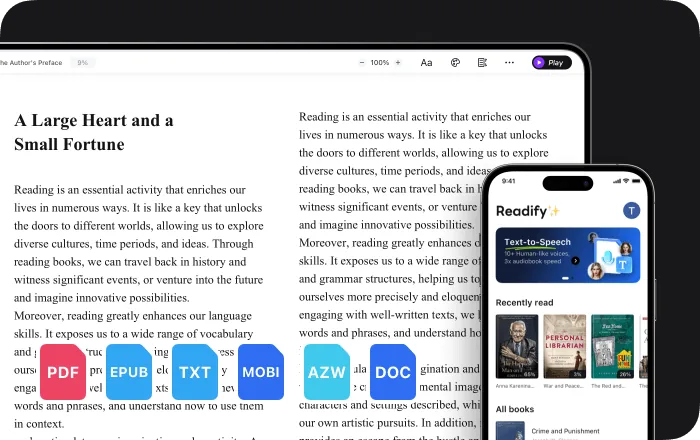
Add an EPUB, PDF, DOCX, AZW, MOBI, or TXT file, or open compatible web content with the Readify browser extension.
Choose a Natural Voice and Pace
Step 2
Choose a Natural Voice and Pace
Select a voice you find comfortable, then adjust the reading speed for the material instead of forcing every page into one pace.
Listen, Follow the Highlight, and Replay
Step 3
Listen, Follow the Highlight, and Replay
Press play, follow the highlighted sentence when helpful, and pause or replay any line before continuing through the text.

Why Use Text to Speech for Dyslexia?

Text to speech can complement visual reading by adding spoken language, flexible pacing, and a clear way to keep your place. What helps is personal, so every control remains optional.


Add Audio Instead of Relying Only on Visual Reading
Hear the words while the complete text stays available. Audio offers another way into the material without taking away the option to read visually.
Keep Your Place with Synchronized Highlighting
A moving highlight links narration to the current sentence. Use it when hearing and seeing the same words together makes the page easier to follow.
Let the Reading Pace Change with the Text
Move faster through familiar material, slow down technical language, or repeat one passage. The reader adapts without rushing the session.
Build a Self-Directed Reading Routine
Choose when to listen, when to follow the screen, and when to stop. The same reading support can move between study, work, and personal reading.

Reading Support That Stays Close to the Original Words

Readify combines natural narration with simple controls and the source text you selected. Nothing is hidden behind an automatic summary when the complete wording matters.


Natural Text-to-Speech Voices
Choose a lifelike voice for school reading, workplace documents, long articles, eBooks, and other compatible content.
Adjustable Reading Speed
Change the narration speed at any point, giving a familiar paragraph and a demanding section different amounts of time.
Synchronized Text Highlighting
See exactly which sentence is being spoken, making it easier to move between read-aloud support and close visual reading.
Documents and Web Content in One Reader
Use Readify with common eBook and document formats, or add read-aloud controls to compatible web content through the browser extension.

Frequently Asked Questions

How can text to speech help someone with dyslexia?

Text to speech adds spoken language to written material. Some dyslexic readers find it useful to hear the words, follow synchronized highlighting, adjust the pace, or combine listening with visual reading. Individual preferences vary.

Is Readify a dyslexia diagnosis or treatment tool?

No. Readify is an assistive reading tool, not a screening, diagnostic, teaching, or treatment service. For an assessment or individualized educational guidance, consult an appropriately qualified professional.

Do I need a dyslexia diagnosis to use Readify?

No. Anyone can use Readify's text-to-speech, speed controls, and highlighting when those options make reading more comfortable or convenient.

What files can the dyslexia reader read aloud?

Readify supports EPUB, PDF, DOCX, AZW, MOBI, and TXT files. It can also read compatible web content through the Readify browser extension.

Can I see the text while Readify reads it aloud?

Yes. Synchronized highlighting follows the spoken sentence, so you can listen, read visually, or combine both approaches without losing your place.

Can I slow down or speed up the voice?

Yes. Adjust the reading speed to suit the document and your preference, then change it again whenever the text becomes more familiar or more demanding.

Is Readify free to try?

Yes. Readify is free to start, so you can test dyslexia-friendly reading with your own compatible file or readable webpage.