All Topics

Focused Reading, One Sentence at a Time

Turn the text you mean to finish into a session with one clear moving reference point. Listen, follow highlighted words, adjust the pace, pause, and return without losing the source.

iOS App
Listen on iPhone and iPad
Scan to download app
Android App
Listen on any Android device
Scan to download app

Give Long Reading One Clear Thread to Follow

Reading focus can change from page to page. Use narration, synchronized highlighting, and your own pace to stay connected to the current passage and find your way back after an interruption.

Begin the Chapter You Keep Postponing
Start with narration instead of waiting for a perfect stretch of concentration. Follow the text when useful, or listen first and look back for details.
Follow a Dense Article Section by Section
Choose a starting point, listen through one section, and pause before moving on. The source stays available for links, charts, and terms you want to inspect.
Keep the Current Sentence in View
Synchronized highlighting connects each spoken phrase to the original text, giving the session one visible reference point to follow.
Return After an Interruption
Pause when something else needs your attention. When you come back, resume from the saved passage instead of scanning the page for your place.
Replay Instructions Before You Act
Hear a procedure again without rereading the whole page. Pause on the exact sentence, then look at diagrams or controls when they matter.
Listen Through a Work Report
Use audio for introductions, findings, and explanations. Shift back to visual reading for tables, figures, and wording that needs close review.
Hear Your Own Draft in Sequence
Listen back to a draft from beginning to end. Mark the places where the thread feels unclear, then return to the text for precise edits.
Keep Reading When You Change Settings
Move from desk to sofa or take a short walk while narration continues. Pause whenever the material calls for your full visual attention.

Set Up a Focused Reading Session in Three Steps

Bring in the material, choose a comfortable voice and pace, then use listening, highlighting, pause, and replay according to the passage in front of you.


Open the Material You Want to Finish
Step 1
Open the Material You Want to Finish
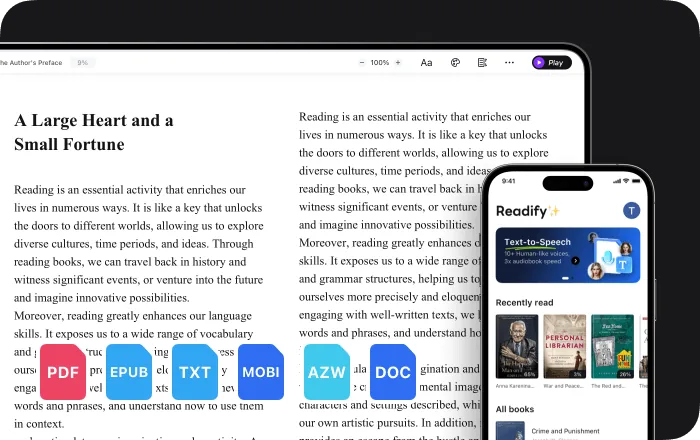
Add an EPUB, PDF, DOCX, AZW, MOBI, or TXT file, or open compatible web content through the Readify browser extension.
Choose a Voice, Speed, and Starting Point
Step 2
Choose a Voice, Speed, and Starting Point
Pick a natural voice, set a pace that fits the material, and begin with the passage that needs your attention now.
Listen, Follow, Pause, and Replay
Step 3
Listen, Follow, Pause, and Replay
Use audio alone or follow the highlighted words. Pause for an interruption, replay a sentence, and return to the same source when ready.

A More Trackable Rhythm for Long-Form Reading

Readify does not increase attention span or block distractions. It offers another way to follow the same source, with controls that some readers find useful when attention shifts.


One Moving Reference Point
The spoken sentence and synchronized highlight move together, so there is one current place to follow instead of an entire page competing for attention.
Audio and Text from the Same Source
Listen without giving up the original words. Look back for names, quotations, figures, and passages that deserve closer reading.
A Pace You Can Change Mid-Session
Slow down technical wording, move faster through familiar context, or replay one sentence without restarting the whole section.
A Clear Place to Resume
Pause when your attention is needed elsewhere. Resume from the same passage and use the highlight to reconnect with the current line.

Reading Controls That Keep the Source Close

Readify combines natural narration with adjustable speed, synchronized highlighting, replay, and support for the material you already need to read.


100+ Natural Text-to-Speech Voices
Choose a realistic voice for articles, eBooks, PDFs, reports, and other compatible digital reading.
Adjustable Narration Speed
Change the playback rate whenever the density or familiarity of the current passage changes.
Pause, Replay, and Synchronized Highlighting
Stop when needed, repeat a sentence, and keep the spoken words connected to their place in the original text.
Documents, eBooks, and Web Content
Use common file formats or add read-aloud controls to compatible webpages through the Readify browser extension.

Frequently Asked Questions

What is text to speech for reading focus?

It converts written material into spoken audio while keeping the original text available. Some readers find that narration and synchronized highlighting give a long passage a clearer current point to follow.

Does Readify improve attention span or guarantee better focus?

No. Readify does not measure, train, or guarantee attention. It provides narration, highlighting, speed control, pause, and replay so you can choose a reading rhythm that suits the material and your preferences.

Is this only for people with ADHD?

No. Anyone can use Readify, with or without a diagnosis. It is a reading tool, not a medical device, ADHD assessment, or treatment.

Does Readify block notifications or other distractions?

No. Readify does not block apps, websites, alerts, or environmental distractions. You can pair it with your own device settings and reading routine if you want fewer interruptions.

What files can Readify read aloud?

Readify supports EPUB, PDF, DOCX, AZW, MOBI, and TXT files. It can also read compatible web content through the browser extension.

Can I see the text while I listen?

Yes. You can follow synchronized highlighting, look away and listen, or move between audio and text according to the passage.

Is Readify free to try?

Yes. Readify is free to start, so you can test a focused reading session with your own compatible file or readable webpage.