New: natural AI voices in 30+ languages — press play on anything you read
All Topics

Hear the Words. Follow the Text.

Readify keeps narration and written words moving together. Listen to every sentence, follow synchronized highlighting when it helps, and look back at the original text whenever a detail matters.

iOS App
Listen on iPhone and iPad
Scan to download app
Android App
Listen on any Android device
Scan to download app

Bring Sight and Sound to the Same Page

Use audio and visible text together when one format alone is not enough. Keep the source in front of you, let narration carry the sequence, and choose how closely you want to follow each passage.


Follow a Book While It Is Read Aloud
Listen to the chapter while your eyes stay on the same words. Use highlighting as a moving guide, or glance away and return when you want the text again.
Hear an Article Without Leaving the Page
Turn compatible web text into narration while links, images, headings, and quotations remain visible in their original context.
Match New Terms to Their Written Form
Hear an unfamiliar name or technical term as it appears on screen. Pause and replay the sentence while keeping the spelling in view.
Keep Your Place in a Dense PDF
Use synchronized highlighting to connect the spoken sentence with its location in the document, then stop for tables, footnotes, or figures.
Listen Back to Your Own Writing
Hear a draft while reading along. The second channel can make missing words, repeated phrases, and awkward transitions easier to notice for some writers.
Pair Workplace Reading with Narration
Follow briefs, policies, and reports in text and audio together. Look closely at exact wording while narration keeps the larger section moving.
Read in a Second Language at Your Pace
Listen to the sentence, follow its written form, slow the narration when needed, and replay short passages without restarting the page.
Move Between Listening and Close Reading
Look away for continuous passages, then return to synchronized text for quotations, numbers, names, and details you want to confirm.

Start Reading with Audio in Three Steps

Open the material you already have, choose how the voice should sound, and decide moment by moment whether to listen, follow the text, or use both.


Open a File or Readable Webpage
Step 1
Open a File or Readable Webpage
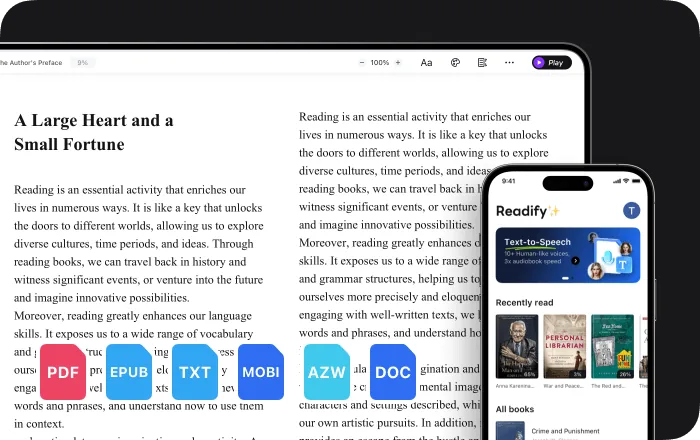
Add an EPUB, PDF, DOCX, AZW, MOBI, or TXT file, or use the Readify browser extension with compatible web content.
Choose a Voice and Comfortable Speed
Step 2
Choose a Voice and Comfortable Speed
Select from more than 100 natural voices and adjust the pace to suit the language, density, and purpose of the reading.
Press Play and Follow as Much as You Want
Step 3
Press Play and Follow as Much as You Want
Watch the highlight move with the narration, listen without looking, or switch between both approaches while staying with the same source.

One Source, Two Ways to Follow It

Reading while listening is a preference, not a guaranteed comprehension shortcut. Readify keeps both modes available so you can use the combination that fits the current passage.


See and Hear the Same Sentence
Narration and highlighting stay connected to one source, making it possible to follow the written and spoken words at the same time.
Keep Exact Wording Within Reach
Audio carries the flow while the original spelling, punctuation, quotations, and layout remain ready for visual checking.
Change Pace Without Changing Material
Slow down a complex paragraph, move faster through familiar context, or replay one sentence while the page stays in front of you.
Choose Audio, Text, or Both at Any Moment
Follow every highlighted word, listen with the screen out of view, or return to the text only when a detail calls for it.

Controls for Synchronized Reading and Listening

Readify adds natural narration, adjustable speed, replay, and synchronized highlighting while keeping the original document or web text available.


Synchronized Text Highlighting
See the current words as they are spoken, providing a visual reference that moves with the audio.
100+ Natural Text-to-Speech Voices
Choose a realistic voice that suits the content, language, and kind of listening session you want.
Adjustable Speed, Pause, and Replay
Change pace between passages, stop whenever you want, and hear one sentence again without losing the written context.
Documents, eBooks, and Web Content
Read and listen to common file formats or compatible webpages through the Readify browser extension.

Frequently Asked Questions

What does it mean to read and listen together?

It means hearing text-to-speech narration while the same written material remains visible. With synchronized highlighting, you can follow the current words as they are spoken.

Does reading while listening improve comprehension?

Not for everyone or in every situation. Research findings are mixed, so Readify does not promise better comprehension. It gives you audio, text, highlighting, and pace controls so you can decide what works for the material.

Do the spoken words stay synchronized with the text?

Yes. Readify highlights the text being spoken, helping you connect the narration to its current location in the source.

Can I listen without watching the text?

Yes. You can follow every word, look away and listen, or move between audio and text whenever you want.

Can I use Readify for language learning?

You can use the voice, speed, highlighting, pause, and replay controls to hear and see the same text. Readify does not guarantee language-learning outcomes.

What files can I read and listen to?

Readify supports EPUB, PDF, DOCX, AZW, MOBI, and TXT files, plus compatible web content through the browser extension.

Is Readify free to try?

Yes. Readify is free to start, so you can try synchronized reading and listening with your own compatible file or readable webpage.