
Introduction
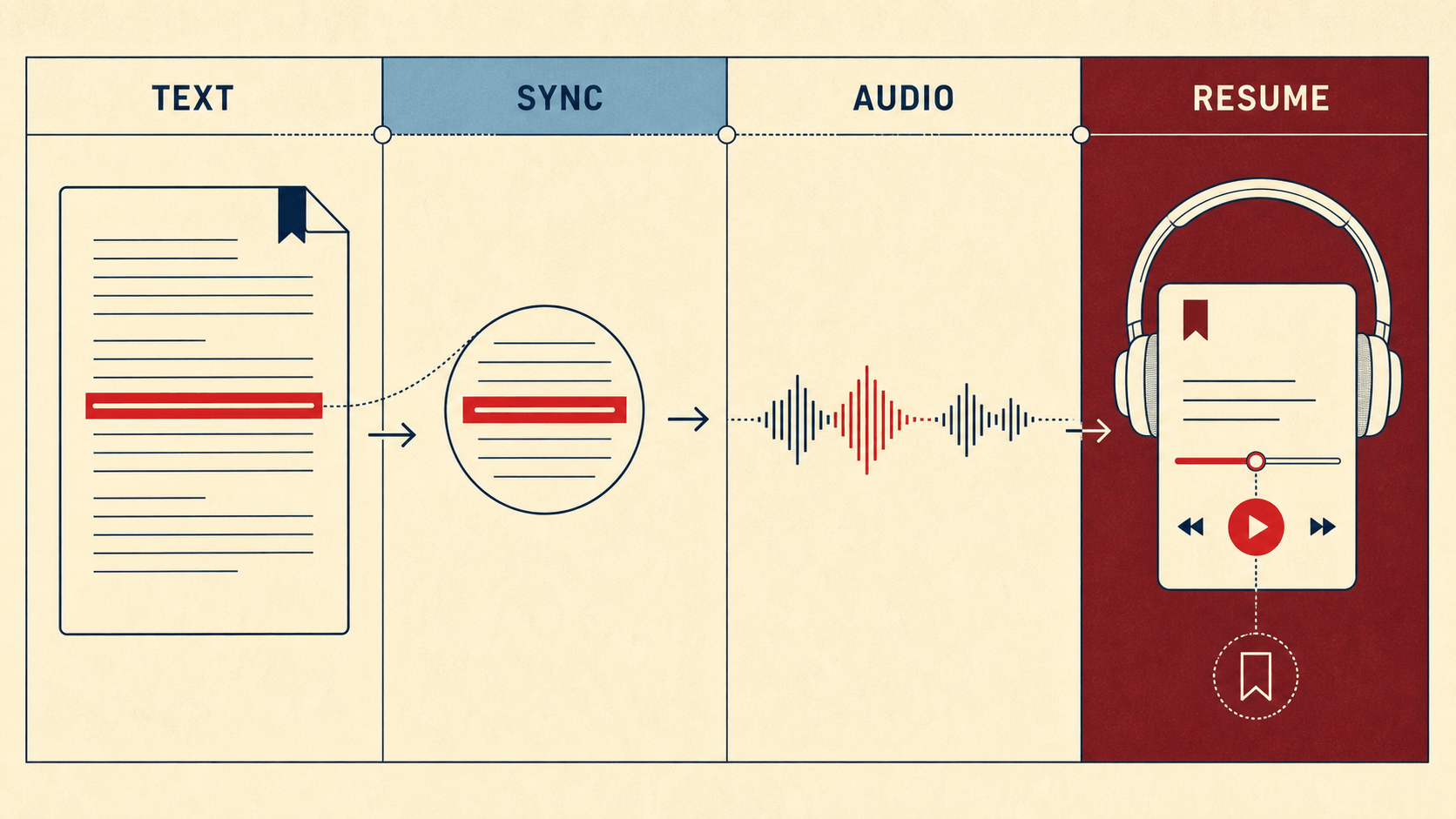
Text and reading no longer have to be separate activities. A modern text-to-speech (TTS) app can keep the words visible while turning them into audio, so you can follow a paragraph on screen, listen while commuting, or switch between the two when your attention changes. The difficult part is not finding an app that can speak. It is finding one that fits the material you actually read.
What is the best way to combine text and reading?
Choose a TTS app that keeps text visible, highlights the current passage, remembers your place, and accepts the formats you use. Then test one real document from import to playback. Voice quality matters, but reliable navigation, accessible controls, privacy, and clear limits usually determine whether text and reading work together every day. That simple test is more useful than comparing feature counts. A beautiful demo voice cannot compensate for a PDF that imports badly, a web article that loses its headings, or a free plan that stops halfway through a chapter. The six features below turn a general TTS promise into practical buying criteria.
What is TTS?
If you are asking 'what is TTS?', the short answer is text to speech: technology that converts written words into synthesized audio. In a basic tool, you paste text and press play. In a reading app, TTS is connected to a document library, page navigation, text highlighting, speed controls, bookmarks, and your position in a book or article. The distinction matters because a reading session is not a one-time voice demo. You may need to return to chapter 12 tomorrow, search for a term, slow down a dense paragraph, or look back at a quotation. The strongest experience keeps the spoken sentence and the visual document synchronized, giving you a choice rather than forcing you into audio-only use.
A read aloud Chrome extension for web articles
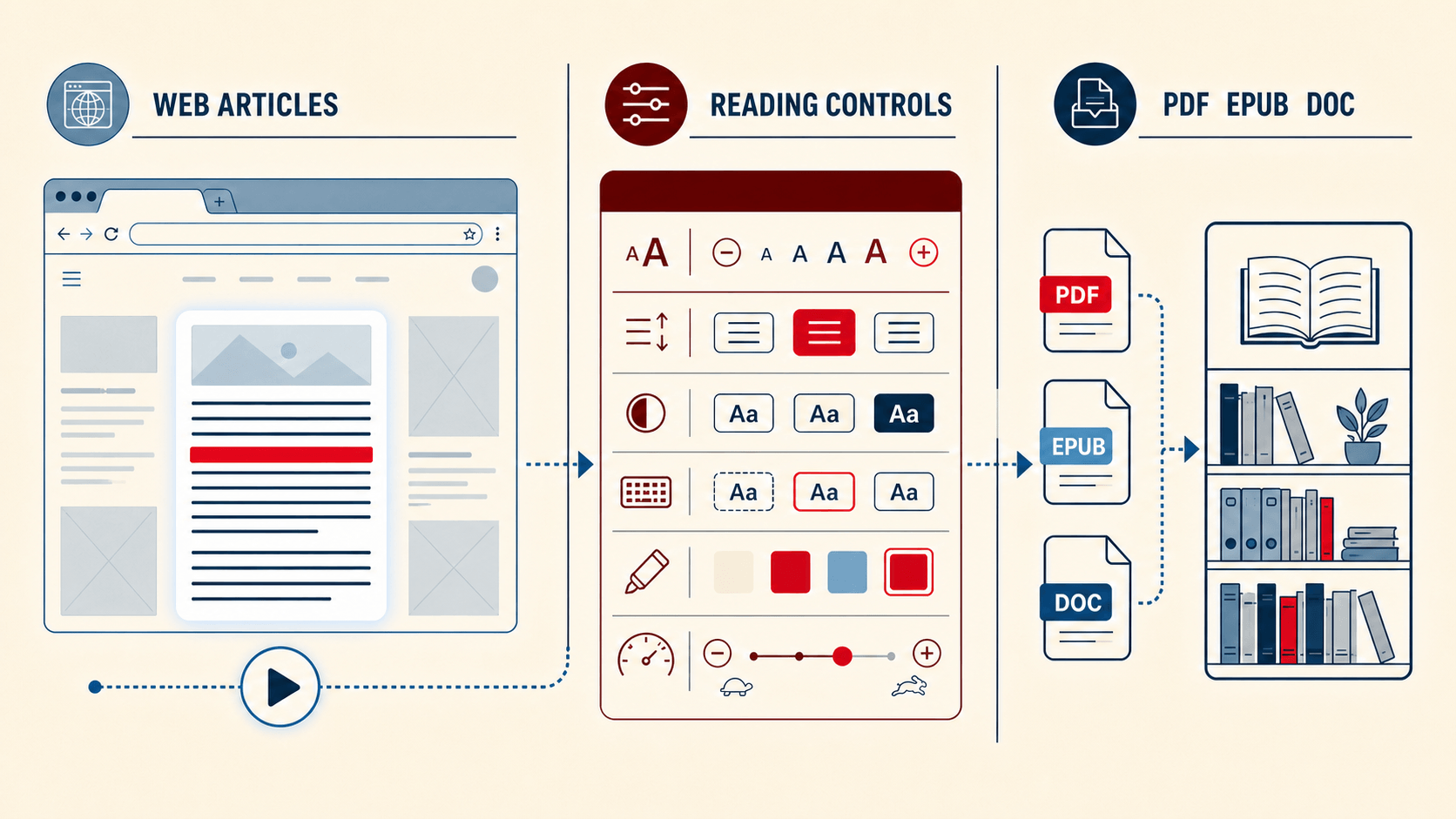
Current browser-reading options include the ElevenReader text-to-speech Chrome extension, which can save articles and web stories for listening, and the Speechify Chrome extension, which provides webpage and document reading, synchronized highlighting, and adjustable playback speed. When comparing the best Chrome extensions for reading articles, test both tools on a clean article, a cluttered page, and a long research page. Compare extraction quality, highlighting, keyboard controls, permissions, and whether listening progress continues across devices.
Accessible reading controls beyond a dyslexia friendly font
A dyslexia friendly font can be useful for some readers, but no single typeface makes an app accessible. Look for adjustable font size, line and letter spacing, color themes, margins, focus or highlighting modes, and playback speed. Controls should remain usable with keyboard navigation and screen readers, and the layout should reflow without hiding content.Current browser-reading options include the ElevenReader text-to-speech Chrome extension, which can save articles and web stories for listening, and the Speechify Chrome extension, which provides webpage and document reading, synchronized highlighting, and adjustable playback speed. When comparing the best Chrome extensions for reading articles, test both tools on a clean article, a cluttered page, and a long research page. Compare extraction quality, highlighting, keyboard controls, permissions, and whether listening progress continues across devices. TTS can support access to written content, but it is not a treatment for dyslexia, low vision, or any other condition. Accessibility claims should be reviewed by people with relevant experience and, ideally, by users who rely on the controls in real reading tasks.
Multi-Format Input and Downloadable Text-to-Speech Audio
A good EPUB reader online should preserve the book's structure: chapters, paragraphs, reading order, and your location. The same principle applies to PDFs, Word files, plain text, and webpages. Format badges are not enough; import quality determines whether the text can be read and heard in a logical sequence. Before choosing an app, upload a representative sample of each format you use. For PDFs, test a two-column page, a scanned page, footnotes, and a table. For EPUB, check the table of contents and chapter transitions. For Word or TXT, confirm that headings and paragraphs remain readable. If the app promises 'PDF to audiobook' or 'EPUB to audiobook,' verify whether that means in-app listening or an exportable audio file. Readify's AI reader and document-listening guide describes workflows for books, PDFs, ebooks, and browser-based reading, while the public homepage currently lists EPUB, PDF, TXT, Word documents, and webpages as import options. Its internal product record also notes PDF and web-import capabilities, but coverage varies by platform and version. Confirm the format you need on iOS, Android, Web, or the extension before turning that detail into a permanent marketing claim.
Multi-format support involves two separate questions: what content the app accepts and what audio it produces. QuillBot Text to Speech converts entered text into speech in multiple languages and allows the resulting audio to be downloaded as an MP3. However, this is different from a dedicated reading library that imports and preserves complete PDF, EPUB, Word, and webpage structures.
Before selecting a multi-format text-to-speech tool, test every format you actually use. For PDFs, check two-column pages, scanned text, tables, and footnotes. For EPUB files, check chapters and the table of contents. For Word and TXT files, confirm that headings and paragraphs remain in the correct reading order. Also verify whether “PDF to audiobook” means temporary online playback, saved-position reading, or an exportable audio file.
AI book discovery and search you can verify
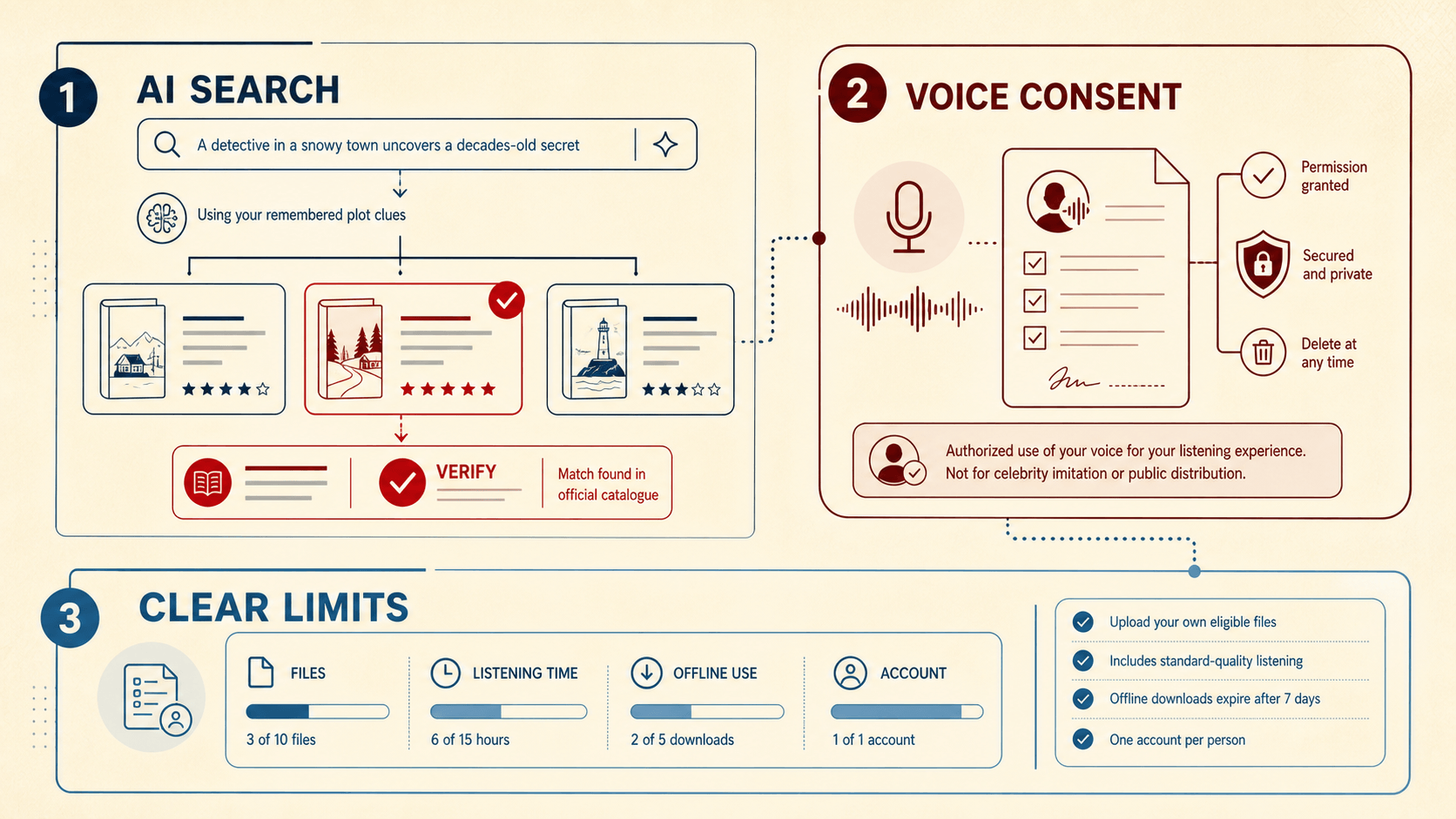
AI can help when you remember a plot, character, cover, or setting but not a title. The long-tail search 'ai to help find book you forgot the name of' describes this discovery need. Give the system what you remember, ask for a short list of candidates, then verify the author, publication date, synopsis, and edition through a library catalogue, publisher page, or bookstore record. This feature should be separated from search inside a book. Readify's internal product record describes full-text search and AI question-and-answer capabilities on several platforms as of June 2026. That can help you work with a book you already imported, but it does not automatically prove a web-wide title-finding feature. Product copy should name the actual scope. A trustworthy app also distinguishes between text evidence and model inference. If an AI answer refers to a passage, you should be able to return to that passage. If it recommends a title, treat the recommendation as a lead to verify, not a bibliographic fact.
Voice cloning with consent and control
Voice cloning can make long-form listening feel personal, especially when you use your own voice or a voice provided with clear permission. It also raises a higher bar for consent, security, deletion, and misuse prevention. Before recording a sample, check who is allowed to create the voice, where the sample is processed, whether generated audio is labeled, how the model can be deleted, and what uses are prohibited. Readify's public homepage presents voice cloning as an optional feature, and the internal product record lists voice-cloning work across iOS, Android, and Web as of June 2026. Availability and implementation should still be checked on the platform named in the article. Never imply that a public figure, creator, family member, or colleague endorsed a product merely because their voice can be imitated. No single technical feature can eliminate every risk associated with voice cloning. Responsible use requires permission, secure handling of voice samples, understandable deletion controls, monitoring, and restrictions on impersonation. The practical rule is simple: use only a voice you own or have clear authorization to use.
A free tier with limits you can understand
'Free' can mean a short trial, a monthly character allowance, basic voices, limited imports, advertisements, or a genuinely usable ongoing tier. The label alone tells you almost nothing. Check the current Readify pricing page for listening limits, premium voices, file size, offline use, exports, account requirements, and what happens to uploaded content. Run the same real-document test before paying. If the free option cannot finish your typical chapter or document, calculate the cost of the plan that can. If it works, confirm whether the features you value - such as voice cloning, AI question answering, or cross-device sync - are included on the platform you use. Readify's public site currently promotes free access, but absolute claims such as 'always free,' 'completely free,' 'no ads,' or 'no paywall' require product-owner confirmation before publication. Pricing and limits can change, so this article should point readers to current product information rather than freeze a promise in time.
How Readify fits this text and reading workflow
Readify is positioned as an all-in-one ebook reader and AI narrator. Its public site describes a combined library for books, PDFs, articles, webpages, EPUB, TXT, and Word files, with visible text, highlighting, pace controls, and spoken narration. The internal product record confirms coverage across iOS, Android, and Web as of June 2026 and notes that feature parity is not complete. That makes Readify a useful candidate for the six-part test, not an excuse to skip it. Import the material you read most, confirm the reading order, try the controls you need, and check the current platform and pricing details. For AI and voice features, verify whether the exact capability is available in your version and whether its privacy and consent controls fit your use case.
Frequently asked questions
Can I use AI to help find a book I forgot the name of?
Yes, but verify the result. People often search for an 'ai to help find book you forgot the name of' tool because they remember fragments rather than a title. Give the AI distinctive details, ask for several candidates, and confirm each one through a reliable catalogue or publisher source. Do not assume the first confident answer is correct.
Is a read-aloud extension the same as a TTS reading app?
Not always. An extension may be fastest for a webpage, while a reading app may offer a library, saved position, document navigation, offline options, and cross-device continuity. Some products connect both experiences; test how smoothly content moves between them.
Does a dyslexia-friendly mode guarantee accessibility?
No. A font or theme can help some people, but accessibility also depends on customizable spacing and color, keyboard and screen-reader support, clear structure, reliable controls, and individual preference. Test the app with the person and task it is meant to support.
The bottom line
The best text and reading experience is not defined by the longest feature list. It is the app that handles your real files, keeps audio and visible text in sync, gives you usable accessibility controls, and explains its AI, voice, privacy, and pricing limits clearly. Try Readify with one document you already need to finish. If Readify passes that test on your platform, it can turn switching between reading and listening into one continuous workflow.
